模拟网络故障
本页面由 PageTurner AI 翻译(测试版)。未经项目官方认可。 发现错误? 报告问题 →
本文档介绍如何在 Chaos Mesh 中使用 NetworkChaos 模拟网络故障。
NetworkChaos 介绍
NetworkChaos 是 Chaos Mesh 中的一种故障类型。通过创建 NetworkChaos 实验,您可以在集群中模拟网络故障场景。目前,NetworkChaos 支持以下故障类型:
-
Partition:网络断开和分区。
-
Net Emulation:网络状况不佳,例如高延迟、高丢包率、数据包乱序等。
-
Bandwidth:限制节点间的通信带宽。
注意事项
创建 NetworkChaos 实验前,请确保满足以下条件:
-
网络注入过程中,请确保 Controller Manager 与 Chaos Daemon 的连接正常,否则 NetworkChaos 将无法恢复。
-
若要模拟 Net Emulation 故障,请确保 Linux 内核已安装 NET_SCH_NETEM 模块。若使用 CentOS,可通过 kernel-modules-extra 包安装该模块。大多数其他 Linux 发行版默认已安装此模块。
使用 Chaos Dashboard 创建实验
-
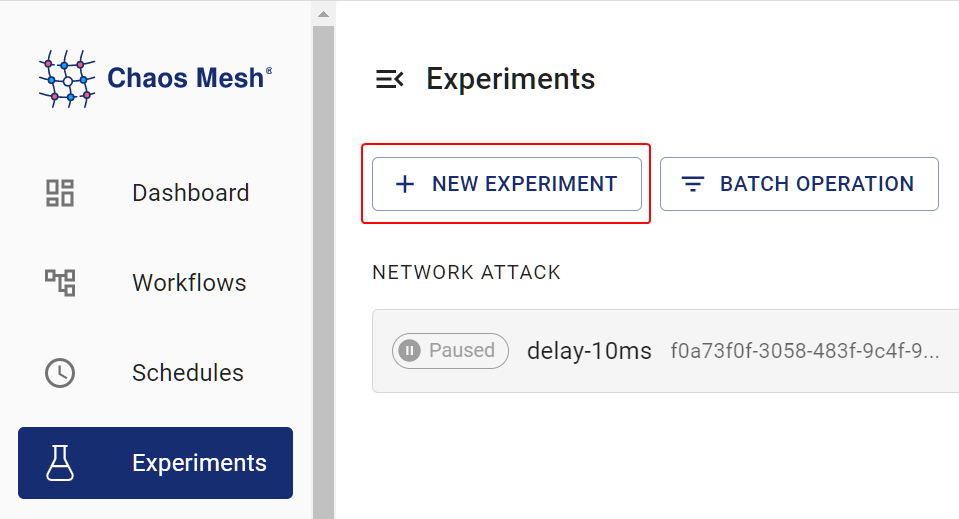
打开 Chaos Dashboard,点击页面上的 新建实验 创建新实验:
Create Experiment -
在 选择目标 区域,选择 网络攻击 并指定具体行为(如 丢包),然后填写详细配置:
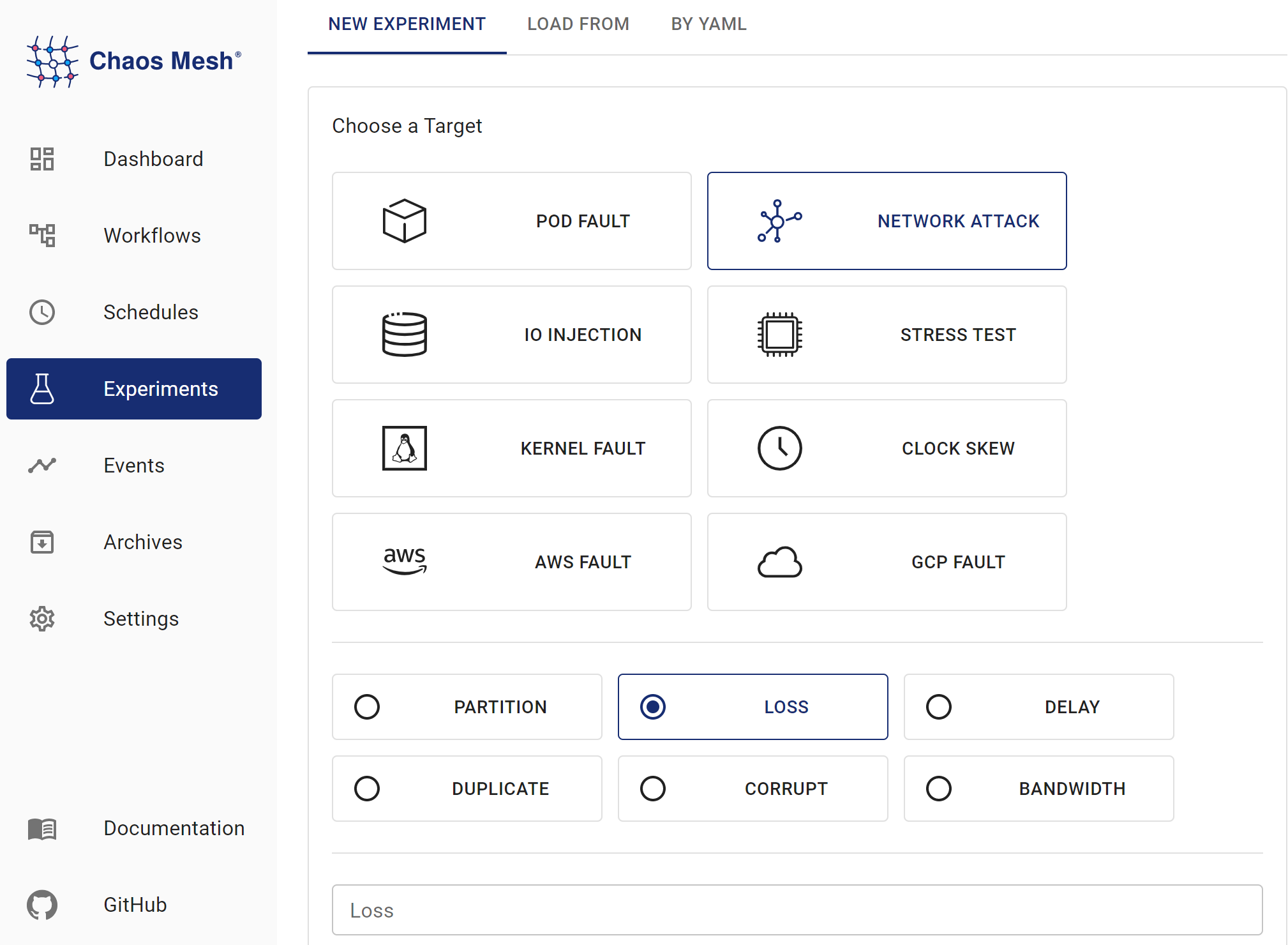
NetworkChaos Experiments 具体配置字段说明请参阅字段描述。
-
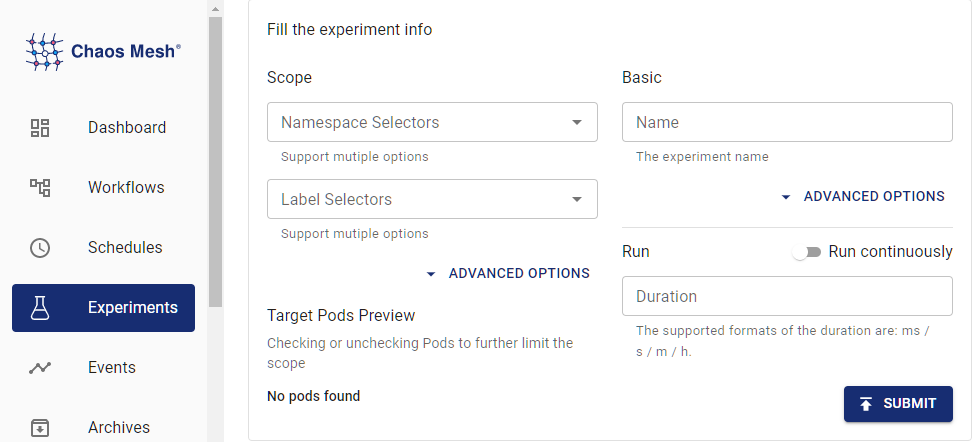
填写实验信息,指定实验范围和计划持续时间:
Experiment Information -
提交实验信息。
使用 YAML 文件创建实验
延迟示例
-
将实验配置写入
network-delay.yaml文件,示例如下:apiVersion: chaos-mesh.org/v1alpha1
kind: NetworkChaos
metadata:
name: delay
spec:
action: delay
mode: one
selector:
namespaces:
- default
labelSelectors:
'app': 'web-show'
delay:
latency: '10ms'
correlation: '100'
jitter: '0ms'此配置会在目标 Pod 的网络连接中引入 10 毫秒延迟。除延迟注入外,Chaos Mesh 还支持丢包和乱序注入,详情参见字段描述。
-
配置文件就绪后,使用
kubectl创建实验:kubectl apply -f ./network-delay.yaml
分区示例
-
将实验配置写入
network-partition.yaml文件,示例如下:apiVersion: chaos-mesh.org/v1alpha1
kind: NetworkChaos
metadata:
name: partition
spec:
action: partition
mode: all
selector:
namespaces:
- default
labelSelectors:
'app': 'app1'
direction: to
target:
mode: all
selector:
namespaces:
- default
labelSelectors:
'app': 'app2'此配置将阻断从
app1到app2的连接。direction字段可选值为to、from或both,详情参阅字段描述。 -
配置文件就绪后,使用
kubectl创建实验:kubectl apply -f ./network-partition.yaml
带宽示例
-
将实验配置写入
network-bandwidth.yaml文件,示例如下:apiVersion: chaos-mesh.org/v1alpha1
kind: NetworkChaos
metadata:
name: bandwidth
spec:
action: bandwidth
mode: all
selector:
namespaces:
- default
labelSelectors:
'app': 'app1'
bandwidth:
rate: '1mbps'
limit: 20971520
buffer: 10000此配置将
app1的通信带宽限制为 1 mbps。 -
配置文件准备完成后,使用
kubectl创建实验:kubectl apply -f ./network-bandwidth.yaml
网络模拟示例
-
将实验配置写入
netem.yaml文件,示例如下:apiVersion: chaos-mesh.org/v1alpha1
kind: NetworkChaos
metadata:
name: network-emulation
spec:
action: netem
mode: all
selector:
namespaces:
- default
labelSelectors:
'app': 'web-show'
delay:
latency: '10ms'
correlation: '100'
jitter: '0ms'
rate:
rate: '10mbps'此配置使目标 Pod 的网络连接产生 10 毫秒延迟并限制带宽为 10mbps。除延迟和带宽限制外,
netem操作还支持丢包、乱序和报文损坏等故障类型。 -
配置文件准备完成后,使用
kubectl创建实验:kubectl apply -f ./netem.yaml
字段说明
| Parameter | Type | Description | Default value | Required | Example |
|---|---|---|---|---|---|
| action | string | Indicates the specific fault type. Available types include: netem, delay (network delay), loss (packet loss), duplicate (packet duplicating), corrupt (packet corrupt), partition (network partition), and bandwidth (network bandwidth limit). After you specify action field, refer to Description for action-related fields for other necessary field configuration. | None | Yes | Partition |
| target | Selector | Used in combination with direction, making Chaos only effective for some packets. | None | No | |
| direction | enum | Indicates the direction of target packets. Available values include from (the packets from target), to (the packets to target), and both ( the packets from or to target). This parameter makes Chaos only take effect for a specific direction of packets. | to | No | both |
| mode | string | Specifies the mode of the experiment. The mode options include one (selecting a random Pod), all (selecting all eligible Pods), fixed (selecting a specified number of eligible Pods), fixed-percent (selecting a specified percentage of Pods from the eligible Pods), and random-max-percent (selecting the maximum percentage of Pods from the eligible Pods). | None | Yes | one |
| value | string | Provides a parameter for the mode configuration, depending on mode. For example, when mode is set to fixed-percent, value specifies the percentage of Pods. | None | No | 1 |
| selector | struct | Specifies the target Pod. For details, refer to Define the experiment scope. | None | Yes | |
| externalTargets | []string | Indicates the network targets except for Kubernetes, which can be IPv4 addresses or domains. This parameter only works with direction: to. | None | No | 1.1.1.1, google.com |
| device | string | Specifies the affected network interface | None | No | "eth0" |
action 相关字段说明
对于网络模拟和带宽故障类型,您可根据以下说明进一步配置 action 相关参数。
-
网络模拟类型:
delay(延迟)、loss(丢包)、duplicated(报文重复)、corrupt(报文损坏)、rate(带宽限制) -
带宽类型:
bandwidth(带宽限制)
delay(延迟)
将 action 设置为 delay 表示模拟网络延迟故障。您还可配置以下参数。
| Parameter | Type | Description | Required | Required | Example |
|---|---|---|---|---|---|
| latency | string | Indicates the network latency | No | No | 2ms |
| correlation | string | Indicates the correlation between the current latency and the previous one. Range of value: [0, 100] | No | No | 50 |
| jitter | string | Indicates the range of the network latency | No | No | 1ms |
| reorder | Reorder(#Reorder) | Indicates the status of network packet reordering | No |
correlation 的计算模型如下:
-
生成与前值相关的随机数:
rnd = value * (1-corr) + last_rnd * corr其中
rnd为随机数,corr即您配置的correlation值。 -
使用该随机数确定当前数据包的延迟:
((rnd % (2 * sigma)) + mu) - sigma上述命令中,
sigma对应jitter(抖动),mu对应latency(基准延迟)。
reorder(乱序)
将 action 设置为 reorder 表示模拟网络报文乱序故障。您还可配置以下参数。
| Parameter | Type | Description | Default value | Required | Example |
|---|---|---|---|---|---|
| reorder | string | Indicates the probability to reorder | 0 | No | 0.5 |
| correlation | string | Indicates the correlation between this time's length of delay time and the previous time's length of delay time. Range of value: [0, 100] | 0 | No | 50 |
| gap | int | Indicates the gap before and after packet reordering | 0 | No | 5 |
loss(丢包)
将 action 设置为 loss 表示模拟报文丢失故障。您还可配置以下参数。
| Parameter | Type | Description | Default value | Required | Example |
|---|---|---|---|---|---|
| loss | string | Indicates the probability of packet loss. Range of value: [0, 100] | 0 | No | 50 |
| correlation | string | Indicates the correlation between the probability of current packet loss and the previous time's packet loss. Range of value: [0, 100] | 0 | No | 50 |
duplicate(报文重复)
将 action 设置为 duplicate 表示模拟报文重复故障。此时您还可设置以下参数。
| Parameter | Type | Description | Default value | Required | Example |
|---|---|---|---|---|---|
| duplicate | string | Indicates the probability of packet duplicating. Range of value: [0, 100] | 0 | No | 50 |
| correlation | string | Indicates the correlation between the probability of current packet duplicating and the previous time's packet duplicating. Range of value: [0, 100] | 0 | No | 50 |
corrupt(报文损坏)
将 action 设置为 corrupt 表示模拟报文损坏故障。您还可配置以下参数。
| Parameter | Type | Description | Default value | Required | Example |
|---|---|---|---|---|---|
| corrupt | string | Indicates the probability of packet corruption. Range of value: [0, 100] | 0 | No | 50 |
| correlation | string | Indicates the correlation between the probability of current packet corruption and the previous time's packet corruption. Range of value: [0, 100] | 0 | No | 50 |
对于 reorder、loss、duplicate 和 corrupt 等偶发事件,correlation 参数的设置更为复杂。具体模型描述请参考 NetemCLG。
rate
将 action 设置为 rate 表示模拟带宽速率故障。此操作与下方 bandwidth/rate 类似,但关键区别在于此操作可与上述其他 netem 操作组合使用。若需更精细控制带宽模拟参数(如缓冲区大小限制),请使用 bandwidth 操作。
| Parameter | Type | Description | Default value | Required | Example |
|---|---|---|---|---|---|
| rate | string | Indicates the rate of bandwidth limit. Allows bit, kbit, mbit, gbit, tbit, bps, kbps, mbps, gbps, tbps unit. bps means bytes per second | Yes | 1mbps |
bandwidth
将 action 设置为 bandwidth 表示模拟带宽限制故障,此时还需配置以下参数。
此操作与上述所有 netem 操作互斥。如需在注入带宽速率的同时组合其他网络故障(如数据包损坏),请改用 rate 操作。
| Parameter | Type | Description | Default value | Required | Example |
|---|---|---|---|---|---|
| rate | string | Indicates the rate of bandwidth limit. Allows bit, kbit, mbit, gbit, tbit, bps, kbps, mbps, gbps, tbps unit. bps means bytes per second | Yes | 1mbps | |
| limit | uint32 | Indicates the number of bytes waiting in queue | Yes | 1 | |
| buffer | uint32 | Indicates the maximum number of bytes that can be sent instantaneously | Yes | 1 | |
| peakrate | uint64 | Indicates the maximum consumption of bucket (usually not set) | No | 1 | |
| minburst | uint32 | Indicates the size of peakrate bucket (usually not set) | No | 1 |
这些字段的详细说明可参阅 tc-tbf 文档。建议将 limit 设置为至少 2 * rate * latency,其中 latency 表示源与目标间的预估延迟(可通过 ping 命令测量)。若 limit 过小会导致高丢包率,进而影响 TCP 连接的吞吐性能。