模拟 Pod 故障
本页面由 PageTurner AI 翻译(测试版)。未经项目官方认可。 发现错误? 报告问题 →
本文档介绍如何使用 Chaos Mesh 向 Kubernetes Pod 注入故障以模拟 Pod 或容器故障,并提供通过 Chaos Dashboard 和 YAML 文件创建 PodChaos 实验的方法。
PodChaos 介绍
PodChaos 是 Chaos Mesh 中的一种故障类型。通过创建 PodChaos 实验,您可以模拟指定 Pod 或容器的故障场景。目前 PodChaos 支持以下故障类型:
-
Pod Failure:向指定 Pod 注入故障,使该 Pod 在一段时间内不可用。
-
Pod Kill:杀死指定 Pod。为确保 Pod 能成功重启,需要配置 ReplicaSet 或类似机制。
-
Container Kill:杀死目标 Pod 中的指定容器。
使用限制
Chaos Mesh 可以向任何 Pod 注入 PodChaos 故障,无论该 Pod 是否绑定到 Deployment、StatefulSet、DaemonSet 或其他控制器。但当向独立 Pod 注入 PodChaos 时可能出现特殊情况,例如向独立 Pod 注入 "pod-kill" 混沌时,Chaos Mesh 无法保证应用能从故障中恢复。
注意事项
创建 PodChaos 实验前,请确保满足以下条件:
-
目标 Pod 上没有运行 Chaos Mesh 的控制管理器(Control Manager)
-
若故障类型为 Pod Kill,需配置 replicaSet 或类似机制确保 Pod 能自动重启
使用 Chaos Dashboard 创建实验
使用 Chaos Dashboard 创建实验前,请确保:
- 已安装 Chaos Dashboard
- 如果已安装 Chaos Dashboard,可运行
kubectl port-forward访问 Dashboard:bash kubectl port-forward -n chaos-mesh svc/chaos-dashboard 2333:2333。然后访问http://localhost:2333进入 Chaos Dashboard
-
打开 Chaos Dashboard,点击页面上的 NEW EXPERIMENT 创建新实验
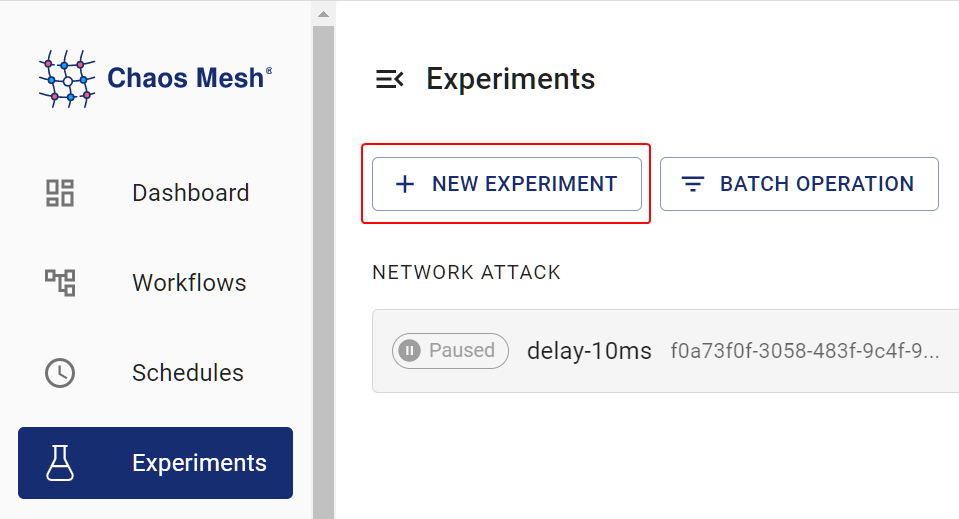
创建新实验 -
在 Choose a Target 区域选择 POD FAULT,并选择具体行为(如 POD FAILURE)
-
填写实验信息,指定实验范围和计划持续时间。
-
提交实验信息。
使用 YAML 配置文件创建实验
pod-failure 示例
-
将实验配置写入
pod-failure.yaml文件:apiVersion: chaos-mesh.org/v1alpha1
kind: PodChaos
metadata:
name: pod-failure-example
namespace: chaos-mesh
spec:
action: pod-failure
mode: one
duration: '30s'
selector:
labelSelectors:
'app.kubernetes.io/component': 'tikv'此配置会使 Chaos Mesh 向指定 Pod 注入
pod-failure故障,使 Pod 在 30 秒内不可用 -
配置文件准备完成后,使用
kubectl创建实验:kubectl apply -f ./pod-failure.yaml
pod-kill 示例
-
将实验配置写入
pod-kill.yaml文件:apiVersion: chaos-mesh.org/v1alpha1
kind: PodChaos
metadata:
name: pod-kill-example
namespace: chaos-mesh
spec:
action: pod-kill
mode: one
selector:
namespaces:
- tidb-cluster-demo
labelSelectors:
'app.kubernetes.io/component': 'tikv'根据此示例,Chaos Mesh 会向指定 Pod 注入
pod-kill故障并杀死该 Pod 一次。 -
配置文件准备就绪后,使用
kubectl创建实验:kubectl apply -f ./pod-kill.yaml
container-kill 示例
-
将实验配置写入
container-kill.yaml文件:apiVersion: chaos-mesh.org/v1alpha1
kind: PodChaos
metadata:
name: container-kill-example
namespace: chaos-mesh
spec:
action: container-kill
mode: one
containerNames: ['prometheus']
selector:
labelSelectors:
'app.kubernetes.io/component': 'monitor'根据此示例,Chaos Mesh 会向指定容器注入
container-kill故障并杀死该容器一次。 -
配置文件准备就绪后,使用
kubectl创建实验:kubectl apply -f ./container-kill.yaml
字段说明
下表描述了 YAML 配置文件中的字段含义。
| Parameter | Type | Description | Default value | Required | Example |
|---|---|---|---|---|---|
| action | string | Specifies the fault type to inject. The supported types include pod-failure, pod-kill, and container-kill. | None | Yes | pod-kill |
| mode | string | Specifies the mode of the experiment. The mode options include one (selecting a random Pod), all (selecting all eligible Pods), fixed (selecting a specified number of eligible Pods), fixed-percent (selecting a specified percentage of Pods from the eligible Pods), and random-max-percent (selecting the maximum percentage of Pods from the eligible Pods). | None | Yes | one |
| value | string | Provides parameters for the mode configuration, depending on mode.For example, when mode is set to fixed-percent, value specifies the percentage of Pods. | None | No | 1 |
| selector | struct | Specifies the target Pod. For details, refer to Define the experiment scope. | None | Yes | |
| containerNames | []string | When you configure action to container-kill, this configuration is mandatory to specify the target container name for injecting faults. | None | No | ['prometheus'] |
| gracePeriod | int64 | When you configure action to pod-kill, this configuration is mandatory to specify the duration before deleting Pod. | 0 | No | 0 |
| duration | string | Specifies the duration of the experiment. | None | Yes | 30s |
"Pod Failure" 混沌实验注意事项
简要说明:使用 "Pod Failure" 混沌实验时有以下建议:
-
若在隔离环境的 Kubernetes 集群中操作,请改用可用的 "pause 镜像"
-
为容器配置
livenessProbe和readinessProbe
Pod Failure 混沌实验会将目标 Pod 中每个容器的 image 替换为 "pause 镜像"——这是一种不执行任何操作的特殊镜像。默认使用 gcr.io/google-containers/pause:latest 作为 "pause 镜像",您可通过 helm 值 controllerManager.podChaos.podFailure.pauseImage 更改为其他镜像。
下载 pause image 需要时间,该时间会计入实验持续时间。因此您可能会发现"实际生效时长"短于配置时长,这也是建议配置可用 "pause 镜像" 的原因之一。
另一需要注意的情况是:未配置容器 command 时,"pause 镜像" 会显示为"正常运行"。如果容器未配置 command、livenessProbe 和 readinessProbe,尽管已被替换为 "pause 镜像" 且实际无法提供正常功能,容器仍会被检测为 Running 和 Ready 状态。因此强烈建议为容器配置 livenessProbe 和 readinessProbe。