模拟 HTTP 故障
本页面由 PageTurner AI 翻译(测试版)。未经项目官方认可。 发现错误? 报告问题 →
本文档介绍如何通过创建 HTTPChaos 实验在 Chaos Mesh 中模拟 HTTP 故障。
HTTPChaos 简介
HTTPChaos 是 Chaos Mesh 提供的一种故障类型。通过创建 HTTPChaos 实验,您可以模拟 HTTP 请求和响应处理过程中的故障场景。目前 HTTPChaos 支持模拟以下故障类型:
-
abort:中断连接 -
delay:在请求或响应中注入延迟 -
replace:替换 HTTP 请求或响应消息中的部分内容 -
patch:在 HTTP 请求或响应消息中添加额外内容
HTTPChaos 支持组合多种故障类型。在创建 HTTPChaos 实验时若同时配置多个 HTTP 故障类型,实验启动时的故障注入顺序为 abort -> delay -> replace -> patch。当 abort 故障导致短路时,连接将直接中断。
有关 HTTPChaos 配置的详细说明,请参阅下方的字段说明。
注意事项
注入 HTTPChaos 支持的故障前,请注意:
-
目标 Pod 中未运行 Chaos Mesh 的控制管理器
-
规则将同时影响 Pod 中的客户端和服务器端,若需仅影响单侧请参阅指定作用侧章节
-
应禁用 HTTPS 访问,因为当前不支持注入 HTTPS 连接
-
为确保 HTTPChaos 注入生效,客户端应避免复用 TCP 套接字。这是因为 HTTPChaos 不会影响故障注入前通过 TCP 套接字发送的 HTTP 请求
-
在生产环境中谨慎使用非幂等请求(如大多数 POST 请求)。若使用此类请求,故障注入后目标服务可能无法通过重复请求恢复正常状态
使用 Chaos Dashboard 创建实验
-
打开 Chaos Dashboard,在页面中点击新建实验创建新实验:
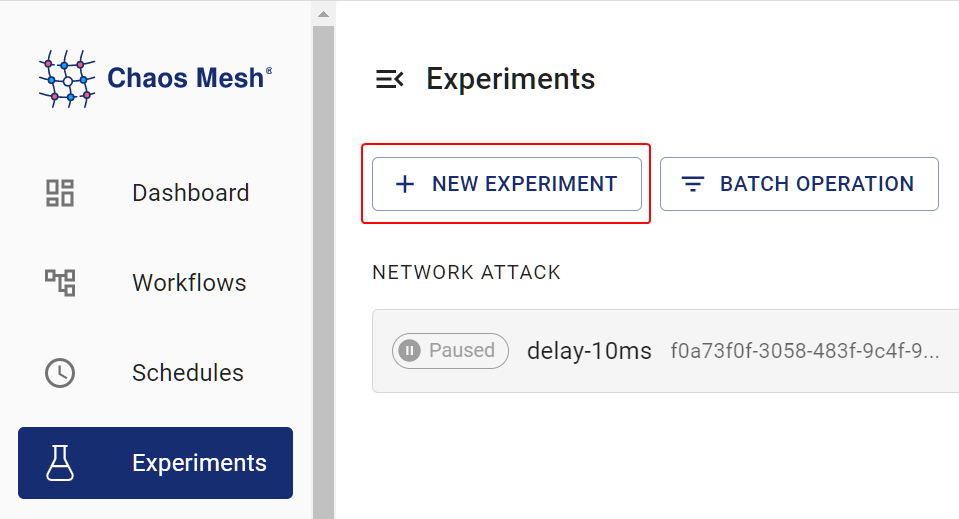
创建实验 -
在选择目标区域,选择 HTTP 故障并指定具体行为(如
RESPONSE ABORT),然后填写具体配置: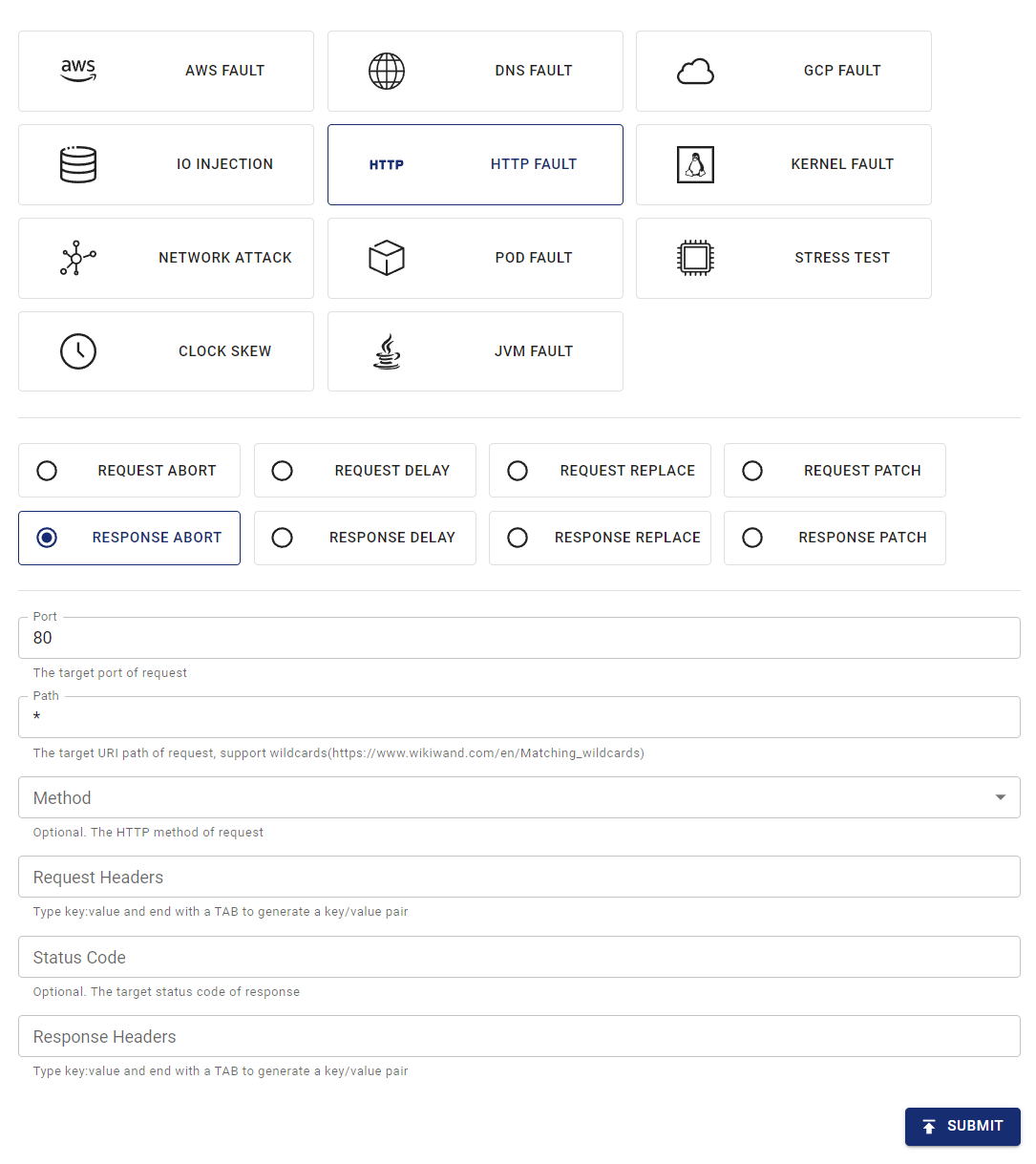
创建 HTTP 故障 -
提交实验。
在上例中,您已配置对所有 80 端口的请求注入"响应中断"故障
使用 YAML 文件创建实验
Chaos Mesh 也支持使用 YAML 配置文件创建 HTTPChaos 实验。在 YAML 文件中可模拟单一 HTTP 故障类型或组合多种 HTTP 故障类型
abort 故障示例
-
将实验配置写入
http-abort-failure.yaml文件,示例如下:apiVersion: chaos-mesh.org/v1alpha1
kind: HTTPChaos
metadata:
name: test-http-chaos
spec:
mode: all
selector:
labelSelectors:
app: nginx
target: Request
port: 80
method: GET
path: /api
abort: true
duration: 5m基于此配置示例,Chaos Mesh 将在指定 Pod 中注入持续 5 分钟的
abort故障。故障注入期间,目标 Pod 80 端口/api路径的 GET 请求将被中断 -
配置文件准备完成后,使用
kubectl创建实验:kubectl apply -f ./http-abort-failure.yaml
故障组合示例
-
将实验配置写入
http-failure.yaml文件,示例如下:apiVersion: chaos-mesh.org/v1alpha1
kind: HTTPChaos
metadata:
name: test-http-chaos
spec:
mode: all
selector:
labelSelectors:
app: nginx
target: Request
port: 80
method: GET
path: /api/*
delay: 10s
replace:
path: /api/v2/
method: DELETE
patch:
headers:
- ['Token', '<one token>']
- ['Token', '<another token>']
body:
type: JSON
value: '{"foo": "bar"}'
duration: 5m根据此配置示例,Chaos Mesh 将依次注入
delay(延迟)、replace(替换)和patch(修补)三类故障。 -
配置文件准备完成后,使用
kubectl创建实验:kubectl apply -f ./http-failure.yaml
字段说明
通用字段说明
当故障注入的 target 设为 Request 或 Response 时,以下通用字段生效。
| Parameter | Type | Description | Default value | Required | Example |
|---|---|---|---|---|---|
mode | string | Specifies the mode of the experiment. The mode options include one (selecting a random pod), all (selecting all eligible pods), fixed (selecting a specified number of eligible pods), fixed-percent (selecting a specified percentage of Pods from the eligible pods), and random-max-percent (selecting the maximum percentage of Pods from the eligible pods). | yes | one | |
value | string | Provides parameters for the mode configuration depending on the value of mode. | no | 1 | |
target | string | Specifies whether the target of fault injuection is Request or Response. The target-related fields should be configured at the same time. | yes | Request | |
port | int32 | The TCP port that the target service listens on. | yes | 80 | |
path | string | The URI path of the target request. Supports Matching wildcards. | Takes effect on all paths by default. | no | /api/* |
method | string | The HTTP method of the target request method. | Takes effect for all methods by default. | no | GET |
request_headers | map[string]string | Matches request headers to the target service. | Takes effect for all requests by default. | no | Content-Type: application/json |
abort | bool | Indicates whether to inject the fault that interrupts the connection. | false | no | true |
delay | string | Specifies the time for a latency fault. | 0 | no | 10s |
replace.headers | map[string]string | Specifies the key pair used to replace the request headers or response headers. | no | Content-Type: application/xml | |
replace.body | []byte | Specifies request body or response body to replace the fault (Base64 encoded). | no | eyJmb28iOiAiYmFyIn0K | |
patch.headers | [][]string | Specifies the attached key pair of the request headers or response headers with patch faults. | no | - [Set-Cookie, one cookie] | |
patch.body.type | string | Specifies the type of patch faults of the request body or response body. Currently, it only supports JSON. | no | JSON | |
patch.body.value | string | Specifies the fault of the request body or response body with patch faults. | no | {"foo": "bar"} | |
duration | string | Specifies the duration of a specific experiment. | yes | 30s | |
scheduler | string | Specifies the scheduling rules for the time of a specific experiment. | no | 5 * * * * | |
tls.secretName | string | SecretName represents the name of required secret resource. The secrete must combined with data {"tls.certName":cert, "tls.KeyName":key, "tls.caName":ca} | no | "http-tls-scr" | |
tls.secretNamespace | string | SecretNamespace represents the namespace of required secret resource,should be the same with deployment/chaos-controller-manager in most cases | no | "chaos-mesh" | |
tls.certName | string | CertName represents the data name of cert file in secret, tls.crt for example | no | "tls.crt" | |
tls.KeyName | string | KeyName represents the data name of key file in secret, tls.key for example | no | "tls.key" | |
tls.caName | string | CAName represents the data name of ca file in secret, ca.crt for example | no | "ca.crt" |
-
使用 YAML 文件创建实验时,
replace.body必须是替换内容的 base64 编码形式 -
通过 Kubernetes API 创建实验时无需编码,只需将内容转换为
[]byte并放入httpchaos.Spec.Replace.Body字段。示例如下:
httpchaos.Spec.Replace.Body = []byte(`{"foo": "bar"}`)
与 target 相关的字段说明
Request 相关字段
当故障注入的 target 设为 Request 时,Request 字段组生效。
| Parameter | Type | Description | Default value | Required | Example |
|---|---|---|---|---|---|
replace.path | string | Specifies the URI path used to replace content. | no | /api/v2/ | |
replace.method | string | Specifies the replaced content of the HTTP request method. | no | DELETE | |
replace.queries | map[string]string | Specifies the replaced key pair of the URI query. | no | foo: bar | |
patch.queries | [][]string | Specifies the attached key pair of the URI query with patch faults. | no | - [foo, bar] |
Respond相关字段
当故障注入的 target 设为 Response 时,Response 字段组才有意义。
| Parameter | Type | Description | Default value | Required | Example |
|---|---|---|---|---|---|
code | int32 | Specifies the status code responded by target. | Takes effect for all status codes by default. | no | 200 |
response_headers | map[string]string | Matches request headers to target. | Takes effect for all responses by default. | no | Content-Type: application/json |
replace.code | int32 | Specifies the replaced content of the response status code. | no | 404 |
指定影响端
默认情况下规则会同时影响 Pod 内的客户端和服务端,但您可以通过选择请求头来限定影响范围。
本节提供指定影响端的示例,您可根据实际情况调整规则中的头部选择器。
客户端场景
要仅影响 Pod 内客户端而不影响服务端,可通过请求中的 Host 头筛选请求/响应。
例如要中断所有发往 http://example.com/ 的请求,可使用以下 YAML 配置:
apiVersion: chaos-mesh.org/v1alpha1
kind: HTTPChaos
metadata:
  name: test-http-client
spec:
  mode: all
  selector:
    labelSelectors:
      app: some-http-client
  target: Request
  port: 80
  path: '*'
  request_headers:
    Host: 'example.com'
  abort: true
服务端场景
要仅影响 Pod 内服务端而不影响客户端,同样可通过请求中的 Host 头筛选请求/响应。
例如要中断所有发往服务 nginx.nginx.svc 后端的请求,可使用以下 YAML 配置:
apiVersion: chaos-mesh.org/v1alpha1
kind: HTTPChaos
metadata:
  name: test-http-server
spec:
  mode: all
  selector:
    labelSelectors:
      app: nginx
  target: Request
  port: 80
  path: '*'
  request_headers:
    Host: 'nginx.nginx.svc'
  abort: true
其他场景下(特别是注入外部传入的请求时),可通过请求中的 X-Forwarded-Host 头筛选请求/响应。
例如要中断所有发往公共网关 nginx.host.org 后端的请求,可使用以下 YAML 配置:
apiVersion: chaos-mesh.org/v1alpha1
kind: HTTPChaos
metadata:
  name: test-http-server
spec:
  mode: all
  selector:
    labelSelectors:
      app: nginx
  target: Request
  port: 80
  path: '*'
  request_headers:
    X-Forwarded-Host: 'nginx.host.org'
  abort: true
TLS 支持
要在基于 TLS 的连接中注入故障,需启用 TLS 模式。此时代理需同时扮演两种角色:作为远端服务器时需提供可信 CA,作为客户端时需信任服务端 CA。
因此用户需在 secret 数据中自行创建 TLS 密钥、CA 和证书。
{
  "tls.certName":cert,
  "tls.KeyName":key,
  "tls.caName":ca
}
如果用户需要创建新的 TLS 服务器并注入连接,应执行以下操作:
-
创建自己的根 CA 私钥和根 CA 证书:
openssl req -newkey rsa:4096 -x509 -sha512 -days 365 -nodes -out ca.crt -keyout ca.key -
创建服务器的证书签名请求(CSR):
openssl genrsa -out server.key 2048
openssl req -new -key server.key -out server.csr -
为服务器编写扩展文件
server.ext,内容如下:authorityKeyIdentifier=keyid,issuer
basicConstraints=CA:FALSE
keyUsage = digitalSignature, nonRepudiation, keyEncipherment, dataEncipherment
subjectAltName = @alt_names
[alt_names]
IP.1 = X.X.X.X -
生成服务器证书:
openssl x509 -req -in server.csr -CA ca.crt -CAkey ca.key -CAcreateserial -out server.crt -days 365 -sha256 -extfile server.ext -
将 CA 证书
ca.crt添加到客户端。 -
将
server.key、server.crt和ca.crt放入 Secret 并用于 TLS 模式。
如果用户需要注入客户端,应让 HTTP Chaos 代理充当远程服务器,只需编辑上述 server.ext 文件以指定域名。
示例:
subjectAltName = @alt_names

[alt_names]
DNS.1 = *.domain.com
IP.1 = xxx.xxx.xxx.xxx
本地调试
如果不确定某些故障注入的效果,您也可以使用 rs-tproxy 在本地测试相应功能。Chaos Mesh 还通过 chaos-tproxy 提供 HTTP Chaos 功能。